

Calling picdrop one of the best photo proofing platforms for professional photographers might sound like a bold claim, but let me back it up with solid reasoning.
With smooth image approval workflow, precise built-in photo feedback tools, Adobe Lightroom integration, and rock-solid security, picdrop makes online proofing galleries a breeze to manage. It helps you organize and share photos, and get client feedback on images faster. Happy clients, happy life!
Let me walk you through the standout features that make picdrop my favorite photo proofing software by showing how I, Illya Ovchar, use it daily as a professional photographer.
Photo Annotation for Precise Photo Feedback
Let’s start with my favorite picdrop photo proofing features: photo flagging for client selection and photo annotation for client feedback.
The photo proofing stage often drags on; not because your shots don’t meet expectations, but because gathering clear client feedback on images can be slow and messy. Multiple emails, unclear comments, and scattered approvals can stall your photography workflow.
picdrop streamlines the entire image approval workflow with intuitive photo selection tools. Clients can assign color-coded flags to the images, such as green for ‘approved,’ yellow for ‘maybe,’ and red for ‘rejected.’
For group photos or projects that require multiple approvals, the photo ‘like’ feature acts as a voting system. You can see which photos get the most votes by using the ‘filter and search’ feature.
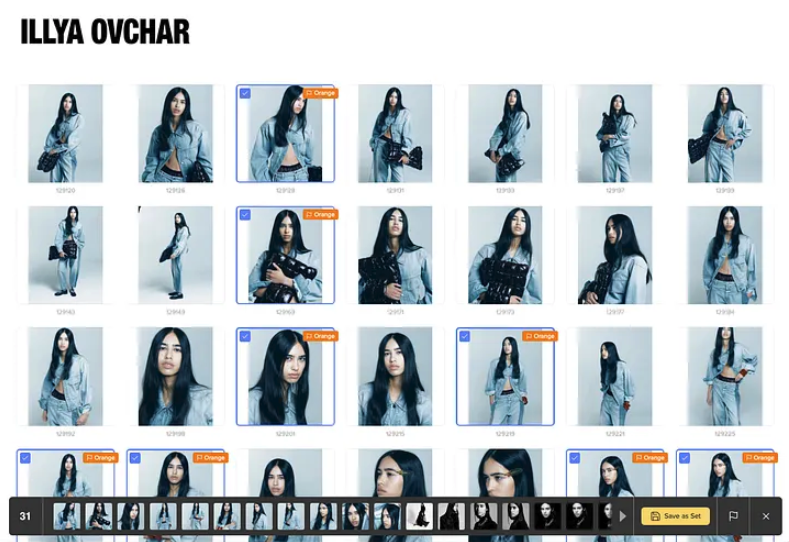
For editorial or commercial projects, the built-in photo annotation mode is a game-changer. To request specific image editing, instead of downloading the images, marking them up elsewhere, and sending them back to me via email or Dropbox, editors can scribble on the photo directly and add comments. Super helpful when I work for magazines, ad agencies, or with retouchers.
Related: Which is better: WeTransfer or Dropbox for photo sharing? See their pros and cons and a smarter photo delivery alternative.
Adobe Lightroom Integration for Frictionless Photo Editing
Large photo projects can leave you with hundreds of client-approved shots that need editing. In the past, I’d have to hunt down each selection manually, move them into a separate folder, and then import them into Adobe Lightroom.
With picdrop’s Adobe Lightroom integration, that tedious step is gone. I simply filter the approved images in the client gallery (say, by the ‘green’ flag) and let picdrop export their filenames directly to Lightroom. This small change saves me a lot of time and makes my photography workflow far more efficient.
Popular Photo and Video File Formats Compatibility
Different projects call for different file types. I might deliver RAW images for retouching, high-resolution TIFFs for print, or JPGs for quick web use. With picdrop, there’s no need to juggle multiple tools or waste time on file conversions. Just upload your files as they are, and picdrop sorts and prepares them for sharing in minutes.
And it’s not just for photos; picdrop handles videos, too. This way, clients can review all visual assets in a single place, making picdrop a true all-in-one platform for sharing visual content with clients.
Rock-Solid Security For Photographers and Clients
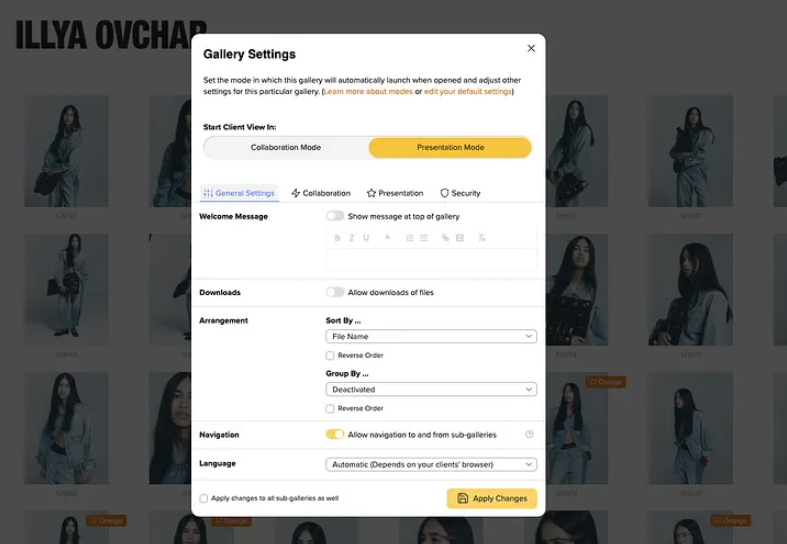
My clients trust me to capture photos for their promotional campaigns, and I honor that trust by making sure their photos never fall into the wrong hands—like unwanted parties or even AI. picdrop offers strong, built-in security so every photo and video I upload stays protected.
Better yet, this secure image delivery system doesn’t come at the cost of convenience. I can set a private gallery with a safe, randomly generated password (picdrop even suggests one that’s hard to guess). Only people with the login details can view the gallery.
For clients, the access is simple. They click the link I send (or scan a QR code) and enter their credentials. No app downloads, no account sign-ups—just instant access to their photos.
Full Control Over Access, Downloads, and Watermarking
picdrop also gives me complete control over how clients can interact with their galleries. If I want them to review and comment on images without saving them, I simply disable downloads. This keeps my creative files secure while still allowing feedback.
When I need an extra layer of protection – for instance, for unreleased campaign shots or editorial previews – I can enable automatic watermarking. picdrop applies the watermark to every image in the gallery for me, saving the time and effort of doing it manually.
Customizable Client Photo Gallery
One of the final reasons I consider picdrop the best photo proofing software is that it also offers a photo sharing solution, allowing you to create fully customizable photo delivery galleries.
This isn’t about photo proofing and client selections, but the finished presentation. When the project is complete, I want my clients to receive their images in a way that reflects my artistic vision. With picdrop, I can customize the gallery’s background color, layout, welcome message, and more, so every delivery feels polished and personal. The branding options are extensive, allowing me to create a viewing experience that feels uniquely mine.
And these photo galleries aren’t just for end clients, either. On commercial projects, the team often brings my photos to meetings and presents my work to larger groups. With picdrop’s online photo gallery, everything is displayed in one continuous, elegant flow. No need to open individual files or prepare mockups just for this occasion. Stakeholders can view the full set in seconds and share the link instantly with other teams, and they can download and directly use my photos for their campaigns.
To me, picdrop is the Best Photo Proofing Platform for Professional Photographers
picdrop delivers far more than simple photo proofing and sharing. It’s a complete, photographer-designed solution that supports every stage of my photography workflow.
From streamlining client photo approval and feedback to offering a secure image delivery system and presenting the photos in a beautiful photo gallery, picdrop elevates the entire client experience. It’s this all-in-one approach that puts picdrop a step above other photography tools, and makes it my go-to photo proofing platform in 2025.
Try picdrop for free today! Use the forever-free plan to explore all features and upgrade when you’re ready.