

Until now, picdrop has mainly been the place where you deliver images and files to clients, teams, or project stakeholders. With the new Inbox, it now works the other way around too: others can send files directly to you via an upload link.
This is a real improvement for photographers who want to collect images, logos, or references from clients, as well as for teams, agencies, and organizations that need a central, clear, and straightforward way to receive files from external people.
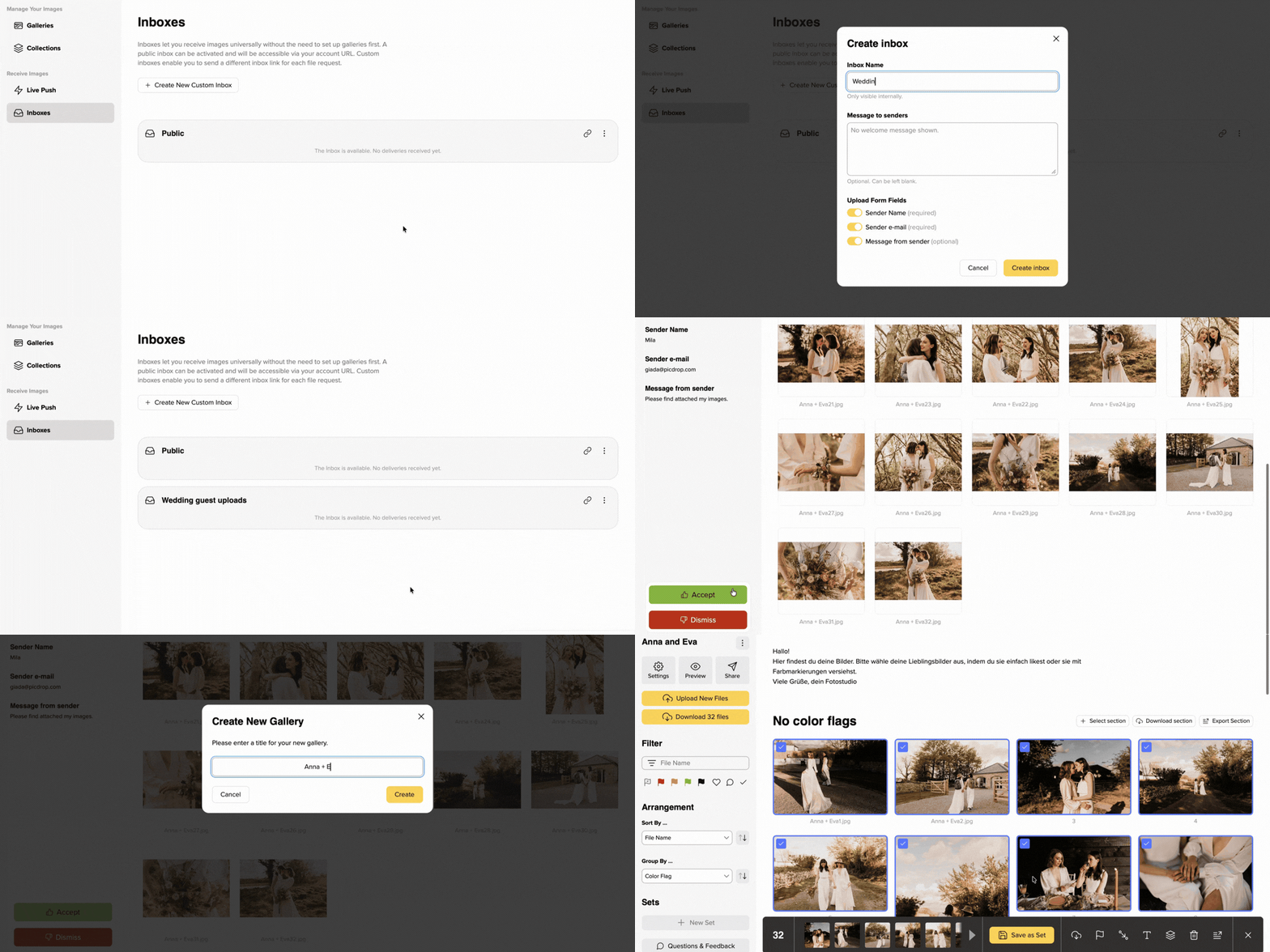
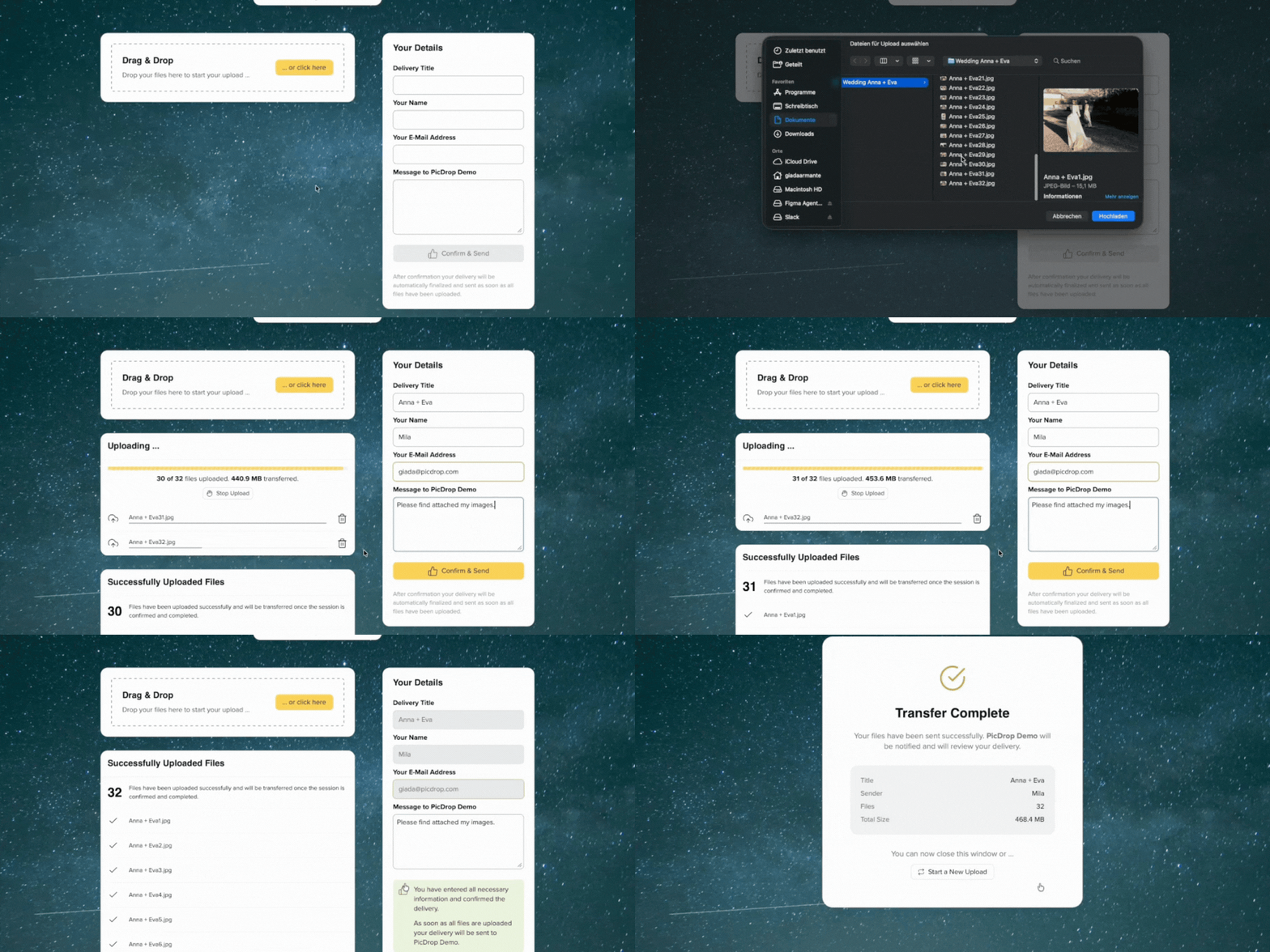
To get started, you create an Inbox, share the link, and wait for the uploads to come in. The people sending you files don’t need their own login, and they won’t see any existing gallery content. All incoming files are collected in picdrop, where you can review, accept, or reject them.
Only once you accept files do you move them into a new or existing gallery.
For photographers: when clients need to send you something
Many photography projects don’t just involve finished images from you. They also require material from other people.
For weddings, for example, you might want to collect guest photos, request old family pictures for a surprise slideshow, or gather files from witnesses, friends, or family members. With Inbox, you simply share an upload link without giving guests access to your finished galleries or any other content.
Inbox is also helpful for commercial work. Clients can upload logos, moodboards, reference images, product photos, or brand assets directly to picdrop. Instead of searching through emails, chat threads, or different upload links later, everything is collected in one place.
Inbox is useful for collecting things like:
- guest photos from weddings
- reference images before a shoot
- logos and brand assets from clients
- image material for layouts, retouching, or presentations
- uploads from service providers, assistants, or second shooters
The biggest benefit: you get a professional, branded upload process that is simple for your clients and saves you a lot of follow-up work.
For teams, agencies, and organizations: one central place for incoming files
Inbox is also an important step for teams. picdrop becomes not only the place where you share files, but also the place where files arrive.
In agencies, marketing teams, companies, media productions, or event setups, files often come from many different sources: clients, partners, freelancers, photographers, internal departments, or external service providers.
With Inbox, you can create dedicated upload spaces for projects, clients, or recurring workflows. External people upload their files without getting access to your existing galleries or internal content. You can then review the incoming files in picdrop and decide what to keep.
This is especially useful for:
- marketing teams collecting brand assets or campaign material
- agencies receiving files from clients and partners
- event teams collecting photos or material from participants
- companies that need structured upload processes for external contributors
- teams that want to review files before using them further
Instead of managing lots of separate incoming channels, you get one clear, professional process.
Review first, then add to your galleries
All files uploaded through an Inbox first arrive in picdrop. From there, you can view them, review them, and decide what should happen next.
You can:
- move uploads into an existing gallery
- add them directly to a new gallery
- reject them
If you reject a submission, the files are deleted. Only accepted files become part of your gallery structure.
That means incoming files don’t automatically end up among your finished projects. They stay in a separate area until you actively sort them.
Receive files without giving access to your content
People uploading files through an Inbox cannot see any existing gallery content.
This solves many situations where a regular gallery upload is not ideal. For example, you might want to collect guest photos for a wedding before the finished gallery is visible. Or clients may need to send you assets without seeing drafts, other files, or internal content.
Inbox is intentionally designed as an upload-only space: share the link, receive files, decide what to do with them later.
Public Inbox and custom Inboxes
Every account with the Inbox feature has a Public Inbox. The link to this Public Inbox is shown on your picdrop Frontpage, so others can easily send you files without you having to create a separate Inbox for every upload.
Depending on your plan, you can also create custom Inboxes, for example for specific shoots, clients, campaigns, or projects.
When creating a custom Inbox, you can set a name, a personal welcome message, and optional required fields. For example, you can ask who is uploading the files, which email address belongs to them, or whether they want to include a message.
This is especially helpful when several people submit files and you later want to understand who sent what.
Inbox availability
Inbox is available in different scopes depending on your plan:
- The Pro plan includes the Public Inbox.
- The Advanced plan also includes up to three custom Inboxes.
- Business and Enterprise include unlimited custom Inboxes.
This lets you use Inbox in exactly the way that fits your workflow, from a public upload link to multiple project- or client-specific incoming file spaces.
Try it now
With the new Inbox, picdrop also becomes the professional place for everything that arrives with you or your team.
You’ll find answers to frequently asked questions in our Inbox FAQs. If you have any other questions or feedback, you can always contact our support team at hello@picdrop.com.